

WinRAR 64-bit 7.23
WinRAR 64-bit is the go-to compression tool for Windows, letting you create and extract .rar and .zip files, split large archives into smaller parts, password-protect sensitive data, and even repair damaged archives. It's technically paid, but the 40-day trial never really ends, you just get occasional reminders. It's the only app that can create .rar files, and despite newer alternatives like 7-Zip, it still holds its own thanks to solid encryption, recovery volumes, and regular security updates. Lightweight, reliable, and a bit of a legend in the tech world.
- Free
- Windows
- Oct 8, 2026
Screenshots
About WinRAR 64-bit
Let's be real, if you've ever downloaded something from the internet that came in a weird compressed format, there's a 99% chance you used WinRAR to open it. I mean, it's basically the default tool for dealing with .rar and .zip files, even though half the world never actually paid for it. And yet? It still works. Every time.
WinRAR's whole thing is about making big files smaller, or stuffing a bunch of stuff into a single archive so your folder doesn't look like total chaos. You can split huge files into parts, password-protect sensitive stuff, or just cleanly pack it all before uploading or backing it up. Music, videos, massive project folders, doesn't matter, it handles it.
The 64-bit version is what you want if you're on a newer PC. There's a 32-bit one too, but that's pretty rare these days. Oh, and while it's technically a "paid" tool, it gives you a 40-day trial that basically never ends. You just get little reminders now and then like, "Hey, maybe buy this?" and we all just hit close. It's almost part of the charm at this point, kind of a running joke in the tech world.
What Makes WinRAR Actually Useful?
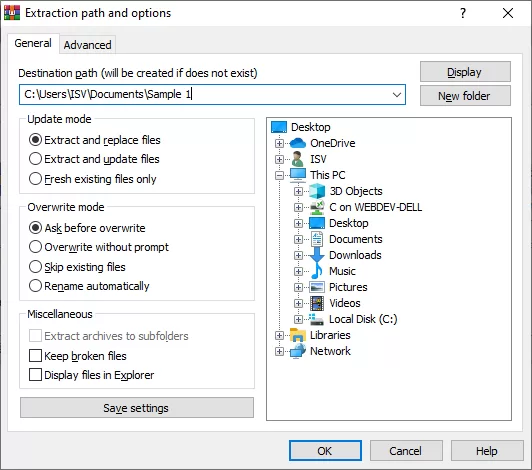
Compression/Extraction: You grab a big folder, hit "Add to Archive," and bam, it's a .rar file. Saves space, easier to upload. Or you get a random archive, right-click → "Extract Here", done.
Splitting Files: Got a 10GB file you need to send in pieces? WinRAR can chunk it into 700MB parts like it's still 2006 and you're burning to CDs. Surprisingly handy.
Encryption: Add a password and your files are locked tight. You can even encrypt file names so people can't peek at what's inside. Decent if you're a little paranoid (or just careful).
Now, here's something most people don't know: WinRAR 7.0, which came out a while back, was actually a pretty big deal. They bumped the compression dictionary size up to 64 GB, which basically means it can compress massive files way more efficiently, think virtual machine images, huge video projects, that kind of thing. They also increased the maximum path length from 2047 characters to 65535 characters, so you can finally nest folders without Windows yelling at you. Oh, and they dropped support for creating old RAR 4.x archives, which... honestly, who cares at this point?
So Wait, It Works Forever?
Yeah. Even after the 40 days, everything still works. You'll get pop-ups asking you to buy it, but nothing breaks. It's one of the weirdest shareware setups ever, and honestly? Kind of legendary at this point.
How Do You Use It? (Don't Worry, It's Easy)
To unzip stuff: Right-click a .rar or .zip → extract it wherever you want. There's a toolbar too, if you like clicking buttons.
To compress: Select your files, click "Add," choose a name and format (.rar or .zip), and you're done. You can tweak compression levels if you're into that, or just go with default.
System Compatibility
It's mainly for Windows, works great on Windows 10 and 11. There's some Android support, and macOS users can open .rar files with it, but there's no full WinRAR app for Mac. So if you're a Mac user, might be worth checking out something like WinZip or iZip instead.
Other Tools Worth Mentioning
WinZip: Has a cleaner Mac experience, but can't make .rar files. That's kind of a dealbreaker if you need that format.
7-Zip: Open-source, supports tons of formats. Great tool, though the UI feels stuck in 2005. And honestly, in a lot of head-to-head comparisons these days, 7-Zip actually wins on compression ratio, its LZMA2 is like 5–10% tighter than RAR5. But here's the catch: 7-Zip can't create .rar files. Only WinRAR can do that. So if you're sending files to someone who insists on .rar, you're stuck with WinRAR.
iZip: Made for Mac/iOS. Simple, but format support is limited.
PeaZip / Bandizip: Light, fast, and decent alternatives. Nothing fancy, but they do the job.
About That Security Flaw in 2023... (And the Ones After)
Okay, so, in 2023, some hacker groups found a vulnerability in older WinRAR versions. Basically, they could sneak bad code into archives disguised as harmless files (like PNGs), and trick the system when you opened them. It was CVE-2023-38831, and it got added to CISA's Known Exploited Vulnerabilities catalog, meaning attackers were actually using it in the wild. There was also CVE-2023-40477, which was a buffer overflow in the recovery volume processing. Both got patched in WinRAR 6.23.
But here's the thing, the security fixes didn't stop there. WinRAR 7.23, which dropped in mid-2026, fixed another heap overflow in the RAR5 recovery volume code, plus some path traversal issues with symbolic links. They also updated the bundled 7zxa.dll library to 7-Zip 26.02 for extra security patches. So yeah, update to the latest version. Seriously. Don't skip this. The auto-updater can be a bit lazy sometimes, so just grab the installer from the official site if it says you're up to date but you're not.
Pros & Cons (Real Talk)
Why It Rocks:
Works like a charm, even for beginners.
Only app that can create .rar files.
Still the king of compression efficiency for certain use cases.
"trial" that never really ends.
Password + encryption? Solid.
Recovery volumes, if your archive gets corrupted, WinRAR can often repair it. 7-Zip can't do that.
Why It's Kinda Annoying:
No proper Mac app, Mac users kinda get left out.
That "Please Buy" pop-up after 40 days is a meme now.
Needs updates now and then for security, or you might get burned.
The UI hasn't really changed since... ever. Some people like it, some don't.
Even with all the newer tools out there, WinRAR 64-bit holds its ground. It's stable, flexible, and super useful, especially if you're dealing with big files, media folders, or anything that needs clean packaging. The fact that it still works without paying? Bonus. Just... keep it updated, alright? And if you're on a Mac, maybe look elsewhere. No shame in that.
What’s new in WinRAR 64-bit 7.23
Here are the release notes for WinRAR 7.30 Beta 1 (64-bit), released on September 10, 2026. This is a beta build, so it's meant for testing and may have some rough edges. Here's what's new:
TAR Sparse File Support: WinRAR can now decompress sparse files inside TAR archives, covering both GNU TAR and PAX sparse formats. When possible, it also creates Windows sparse files during extraction.
NTFS Alternate Data Streams: Handling, display, and error reporting for NTFS streams have been improved when archiving, extracting, and testing.
Viewer Tab Size: A new "Tab size" option in Settings > Viewer lets you control the internal viewer's tab size.
RAR Recovery Fix: Fixed a bug that caused recovery failures when REV files were smaller than 7 bytes.
ZIP Comment Field Bug: WinRAR 7.20 couldn't unpack ZIP archives containing certain file comment fields, this is now fixed.
Wrong Extension Recognition: The archive manager now properly recognizes archives with a wrong file extension.
Unix Random Data Generator Fix: Fixed a bug in RAR for Unix where the random data generator would fall back to using one-second precision system time as a seed.
Command Line Updates: The l and v commands now recognize the a modifier, and a new -da switch can be used with x and e commands.
New Delete Error Code: A new error code has been added for delete operations.
Keep in mind this is a beta release, so if you're using WinRAR for critical work, you might want to stick with the stable version (7.23) until the final 7.30 build drops. Betas are mainly for early testing and feedback.
Versions
| Version | Release date | Platform | File size | |
|---|---|---|---|---|
| WinRAR 64-bit 7.23 Latest version | Oct 8, 2026 | Windows | 3.7 MB | Download |